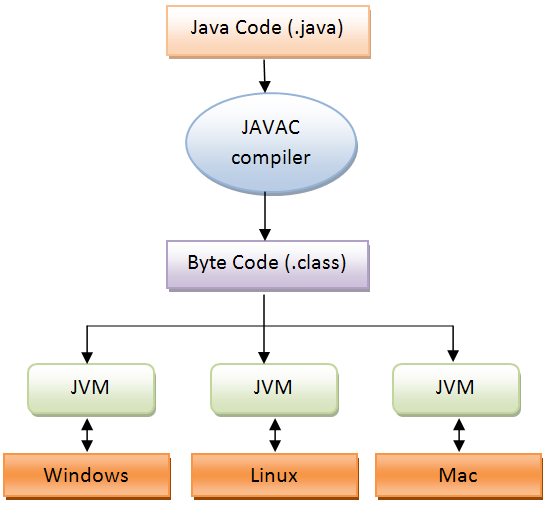
Awt architechture The Abstract Windowing Toolkit (AWT) provides basic facilities for creating graphical user interfaces (GUIs), and also for drawing graphics. AWT has been a core part of Java since Java 1.0. The GUI features of AWT are layered on top of the native GUI system of the underlying platform. In other words, when you create a graphical push button with AWT, AWT creates a Windows push button, or a Macintosh push button, or a Motif push button, or whatever, depending on the platform on which the application is running. In Java 1.1, AWT was extended to allow the creation of "lightweight" GUI components that do not have corresponding native GUI components behind them. ComponentsA graphical user interface is composed of individual building blocks such as push buttons, scrollbars, and pull-down menus. Some programmers know these individual building blocks as controls, while others call them widgets. In Java, they are typically called components because they all inherit from the base class java.awt.Component. When you are describing a GUI toolkit, one of the most important characteristics is the list of components it supports. Table 2-1 lists the heavyweight components provided by AWT, where heavyweight refers to components that are layered on top of native GUI components. The components listed are all classes in the java.awt package. One of the curious features of the AWT is that pull-down and pop-up menus, and the items contained within those menus, are not technically components. Instead of inheriting from Component, they inherit from java.awt. MenuComponent. Nevertheless, the various menu component classes are used in very much the same way that true components.
Heavyweight AWT Components
the components provided by Swing. By convention, the names of these components all begin with the letter J. You'll notice that except for this J prefix, many Swing components have the same names as AWT components. These are designed to be replacements for the corresponding AWT components. For example, the lightweight Swing components JButton and JTextField replace the heavyweight AWT components Button and TextField. In addition, Swing defines a number of components, some quite powerful, that are simply not available in AWT. Swing components are all part of the javax.swing package. Despite the javax package prefix, Swing is a core part of the Java 2 platform, not a standard extension. Swing can be used as an extension to Java 1.1, however. All Swing components inherit from the javax.swing.JComponent class. JComponent itself inherits from the java.awt.Component class, which means that all Swing components are also AWT components. Unlike most AWT components, however, Swing components do not have a native "peer" object and are therefore "lightweight" components, at least when compared to the AWT components they replace. Finally, note that menus and menu components are no different than any other type of component in Swing; they do not form a distinct class hierarchy as they do in AWT. GUI Components of Swing
Containers and Containment. A container is a component that can contain other components. All containers inherit from the java.awt.Container base class, which itself inherits from java.awt.Component. the GUI components available in the AWT and Swing toolkits. In order to create a graphical user interface, however, these individual components must be arranged within some kind of container Main application windows and dialog boxes are commonly used containers. Each provides a window within which GUI components can be arranged to create a user interface. A graphical application does not usually arrange all its components directly within a window or dialog box, however. Instead, an application typically uses containers nested within other containers. For example, a dialog box that contains two columns of text input fields above a row of push buttons might use three separate containers, one for each column of text fields and one for the row of push buttons. Then the dialog box container contains only these three containers, instead of the full set of text fields and push buttons. Some kinds of containers display their children in very specific ways, while others have restrictions on the number or type of components they can display. Some other containers are generic, so they can contain any number of children, arranged in any way. A generic container uses a layout manager to specify how its children should be arranged (as we'll discuss in the next section). Table 2-3 lists the containers provided by AWT (in the java.awt package), and Table 2-4 lists the additional containers provided by Swing (in javax.swing). Menus and menu bars, such as javax.swing.JMenuBar and javax.swing.JPopupMenu, are containers. Because of their highly specialized use, however, I have listed them in the earlier tables of components. Also, the JComponent class extends java.awt.Container, which means that all Swing components are actually containers. In practice, however, they are not used this way; only the Swing classes listed in Table 2-4 are typically used as containers. AWT Containers
Swing Containers
When building a graphical user interface, you must create your components, create the containers that will hold those components, and then add the components to the containers. You do this with one of the add() methods defined by java.awt.Container. In its simplest form, this process looks like this:
There are other versions of the add() method as well. In addition to specifying the component to add, you may also specify a string or an object as a constraint. The container may use this constraint object as a hint that tells it how the component should be arranged in the container. In practice, containers do not use the constraint directly, but pass it on to a layout manager, as we'll discuss shortly. In Swing, the top-level containers JFrame, JDialog, JInternalFrame, JWindow, and JApplet are used slightly differently than containers such as JPanel, JSplitPane, and JTabbedPane. I've said that all Swing components extend JComponent. JFrame, JInternalFrame, JDialog, JWindow, and JApplet are actually exceptions to this rule. These top-level Swing containers extend their corresponding AWT containers: Frame, Dialog, Window, and java.applet.Applet. Because these container classes do not extend JComponent, they do not inherit the Swing-specific features of JComponent. Instead, when you create a JFrame, JInternalFrame, JDialog, JWindow, or JApplet container, the container automatically creates a single child for itself. The child is a JRootPane container. JRootPane does extend JComponent, and it is this automatically created JRootPane that will hold all of the components that are placed in the container. You cannot add children directly to the top-level container. Instead, you add them to the content pane of the JRootPane. All Swing containers that use a JRootPane implement the RootPaneContainer interface. This interface defines the getContentPane() method, which returns the container that you should use. This is not as confusing as it sounds. In practice, your code looks like this:
By default, getContentPane() returns a JPanel container, but you can override this default by creating a container of your own and passing it to setContentPane(). The JRootPane container is a complex one; it contains a number of children in addition to the content pane container. These children support features such as pop-up menus and are primarily for internal use by Swing. One notable and commonly used feature of JRootPane, however, is that it displays a JMenuBar passed to its setJMenuBar() method. (In AWT, you specify a MenuBar for a Frame by calling the setMenuBar() method of Frame.) ActionListener import java.awt.*; import java.awt.event.*; import java.applet.*; import java.awt.Graphics.*; /* <applet code="ramesh" height=350 width=450> </applet> */ public class ramesh extends Applet implements ActionListener { String msg=""; TextField txt=new TextField("ramesh genwa"); TextField txt1=new TextField("ramesh genwa"); public void init() { setForeground(Color.red); setBackground(Color.cyan); txt.addActionListener(this); txt1.addActionListener(this); add(txt); add(txt1); } public void paint(Graphics g) { g.drawString("ramesh Genwa",78,95); g.drawString(msg,190,95); //showStatus(msg); } public void actionPerformed(ActionEvent e) { msg=txt.getText(); txt1.setText("hello usr"); repaint(); } }
Java collection(java.util.*) A collection represents a group of objects, known as its elements.
Some collections allow duplicate elements and others do not. Some are ordered
and others unordered. The SDK does not provide any direct
implementations of this interface: it provides implementations of more specific subinterfaces like Set and List. This interface is typically used to pass collections around and manipulate them where maximum generality is desired. collection are:-
ArrayList, HashSet, LinkedHashSet, LinkedList, TreeSet, Vector
ArrayList (java.util.ArrayList)
The ArrayList class extends AbstractList and
implements the List interface. ArrayList supports dynamic arrays
that can grow as needed. In Java, standard arrays are of a fixed length. After
arrays are created, they cannot grow or shrink, which means that you must know in
advance how many elements an array will hold. But, sometimes, you may not know until run time precisely how large of an array you need. To handle this
situation, the collections framework defines ArrayList. In essence, an ArrayList is a variable-length array of object references. That is, an ArrayList can dynamically increase or decrease in size. Array lists are created with an initial size. When this size is exceeded, the collection is automatically enlarged. When objects are removed, the array may be shrunk. The first constructor builds an empty array list. The second constructor builds an array list that is initialized with the elements of the collection c. The third constructor builds an array list that has the specified initial capacity. The capacity is the size of the underlying array that is used to store the elements. The capacity grows automatically as elements are added to an array list. The following program shows a simple use of ArrayList. An array list is created, and then objects of type String are added to it. (Recall that a quoted string is translated into a String object.) The list is then displayed. Some of the elements are removed and the list is displayed again.
ArrayList has the constructors shown here: ArrayList( ) import java.util.ArrayList;
public class Main {
public Main() { }
public static void main(String[] args) { ArrayList ar=new ArrayList(5); ar.add(0,"ramesh"); ar.add(1,"mahesh"); ar.add(2,"kamal"); ar.add(3,"umang"); for(int i=0;i<3;i++) { System.out.println(ar.get(i)); } System.out.println(ar.isEmpty()); System.out.println("after deletion"); ar.remove(0); for(int i=0;i<3;i++) { System.out.println(ar.get(i)); } ar.removeAll(ar); ar.set(0,"rames"); ar.clear(); System.out.println(ar.isEmpty());
System.out.println("index of===="+ar.indexOf("umang")); System.out.println("sizeof===="+ar.size());
}
}
Vector (java.util.Vector;)
J2SE provide a concept of variable argument of method.Vector
can hold objects of any type and any number.The that can be accessed using an integer index. However, the size of a needed to
accommodate adding and removing items after the
Constructor
Vector() Vector(Collection c) Vector(int initialCapacity)
import java.util.Vector;
public class Vdemo {
public static void main(String[] args) {
Vector ar=new Vector(); Vector ar1=new Vector(); Vector rk=new Vector(45); Vector vk=new Vector(rk);
ar.add(10); ar.add(45);; ar.add(0, 888); ar.add(1, 89); ar1.add(100); ar1.add(545);; ar1.add(88); ar1.add(89); ar.addAll(ar1); for(int i=0;i<=4;i++) { System.out.println(ar.get(i)); } ar.addElement(80); System.out.println(ar.firstElement()); System.out.println(ar.indexOf(10)); ar.setElementAt(9999, 4);
ar.retainAll(ar); ar.clear();
} }
Another Example of Vector import java.util.ArrayList;import java.util.Vector;public class JavaApplication17{public static void main(String[] args){Vector ar=new Vector();Vector ar1=new Vector();Vector rk=new Vector(45);Vector vk=new Vector(rk);ar.add(10);ar.add(45);;ar.add(0, 888);ar.add(1, 89);ar1.add(100);ar1.add(545);;ar1.add(88);ar1.add(89);ar.addAll(ar1);for(int i=0;i<=4;i++){System.out.println(ar.get(i));}ar.addElement(80);System.out.println(ar.firstElement());System.out.println(ar.indexOf(10));ar.setElementAt(9999, 4);ar.retainAll(ar);ar.clear();}}Wrapper Class(java.lang.*)
A primitive wrapper class in the Java programming language
is one of eight classes provided in the java.lang package to provide object methods for the eight primitive types. All of the primitive wrapper classes in Java are immutable. J2SE 5.0 introduced autoboxing of primitive types into their wrapper object, and automatic unboxing of the wrapper objects into their
primitive value—the implicit conversion between the wrapper objects and
primitive values.Wrapper classes are used to represent primitive values when an Object is required. The wrapper classes are used extensively with Collection classes in the java.util package and with the classes in the java.lang.reflect reflection package.
Primitive datatype-->Wrapper Class-->Constructor arguments
Methods to Convert Strings
to Primitive Types
parseXxx() and valueOf()
public
class DemoWrapper {
public static void main(String[] args) { int a=45;
Integer Inval=new Integer(a); System.out.println(++Inval); Float fltval=new Float(78); System.out.println(++fltval); Double dblval=new Double(798); System.out.println(++dblval); Character chval=new Character('a'); ++chval; System.out.println(++chval); Long lngval=new Long(78); System.out.println(lngval); byte bt=1; Byte btval=new Byte(bt); System.out.println(btval);
} } Another program for Wrapper class
public class DemoWrapper {
public static void main(String[] args) { int a=45;
Integer Inval=new Integer(a); System.out.println(++Inval); Float fltval=new Float(78); System.out.println(++fltval); Double dblval=new Double(798); System.out.println(++dblval); Character chval=new Character('a'); ++chval; System.out.println(++chval); Long lngval=new Long(78); System.out.println(lngval); byte bt=1; Byte btval=new Byte(bt); System.out.println(btval); // string to primitive String str=”454”; int x=Integer.parseInt(str); long lngh=Long.parseLong(str); //you can do more more with other wrapper class… . . . . // string to object String str1=”45”; Double dbl=new Double(null); dbl=Double.valueof(str1); Integer intval=new Integer(null); inval=Integer.valueOf(str);// string to Integer object . . .
} }
Java collection A collection represents a group of objects, known as its elements. Some collections allow duplicate elements and others do not. Some are ordered and others unordered. The SDK does not provide any direct implementations of this interface: it provides implementations of more specific subinterfaces like Set and List. This interface is typically used to pass collections around and manipulate them where maximum generality is desired. All Known Implementing Classes: ArrayList, HashSet, LinkedHashSet, LinkedList, TreeSet, Vector This interface is a member of the Java Collections Framework. Since: 1.2 See Also:
(in a level->ArrayList, ArrayList (import java.util.* ) java.util.ArrayList The ArrayList class extends AbstractList and implements the List interface. ArrayList supports dynamic arrays that can grow as needed. In Java, standard arrays are of a fixed length. After arrays are created, they cannot grow or shrink, which means that you must know in advance how many elements an array will hold. But, sometimes, you may not know until run time precisely how large of an array you need. To handle this situation, the collections framework defines ArrayList. In essence, an ArrayList is a variable-length array of object references. That is, an ArrayList can dynamically increase or decrease in size. Array lists are created with an initial size. When this size is exceeded, the collection is automatically enlarged. When objects are removed, the array may be shrunk. The first constructor builds an empty array list. The second constructor builds an array list that is initialized with the elements of the collection c. The third constructor builds an array list that has the specified initial capacity. The capacity is the size of the underlying array that is used to store the elements. The capacity grows automatically as elements are added to an array list. The following program shows a simple use of ArrayList. An array list is created, and then objects of type String are added to it. (Recall that a quoted string is translated into a String object.) The list is then displayed. Some of the elements are removed and the list is displayed again.
ArrayList has the constructors shown here: ArrayList( ) void trimToSize( ) Obtaining an Array from an ArrayList When working with ArrayList, you will sometimes want to obtain an actual array that contains the contents of the list. As explained earlier, you can do this by calling toArray( ). Several reasons exist why you might want to convert a collection into an array such as: • To obtain faster processing times for certain operations. Whatever the reason, converting an ArrayList to an array is a trivial matter, as the following program shows: // get array The output from the program is shown here: The program begins by creating a collection of integers. As explained, you cannot store primitive types in a collection, so objects of type Integer are created and stored. Next, toArray( ) is called and it obtains an array of Objects. The contents of this array are cast to Integer, and then the values are summed.
package javaapplication16;
import java.util.ArrayList;
public class Main {
public Main() { }
public static void main(String[] args) { ArrayList ar=new ArrayList(5); ar.add(0,"ramesh"); ar.add(1,"mahesh"); ar.add(2,"kamal"); ar.add(3,"umang"); for(int i=0;i<3;i++) { System.out.println(ar.get(i)); } System.out.println(ar.isEmpty()); System.out.println("after deletion"); ar.remove(0); for(int i=0;i<3;i++) { System.out.println(ar.get(i)); } // ar.removeAll(ar); ar.set(0,"rames"); //ar.clear(); System.out.println(ar.isEmpty());
System.out.println("index of===="+ar.indexOf("umang")); System.out.println("sizeof===="+ar.size());
}
}
Arraylist provides methods to manipulate the size of the array that is used internally to store the list. ArrayList extends AbstractList and implements List, Cloneable, Serializable. ArrayList capacity .grows automatically. The ArrayList is not synchronized. It permits all elements including null. In this program we are inserting a value. We are using three methods of ArrayList class. add(Object o): Appends the specified element to the end of this list. It returns a boolean value. size(): Returns the number of elements in this list. remove(int index): Removes the element at the specified position in this list. It returns the element that was removed from the list. It throws IndexOutOfBoundsException : if index is out of range. Code of a program is given below: Vector( java.util.Vector;)
‘double c=45; Double dbl=new Double(c);
Dbl isnstanceof Double
J2SE provide a concept of variable argument of method.Vector can hold objects of any type and any number. The
Constructor
Vector() Vector(Collection c) Vector(int initialCapacity)
import java.util.ArrayList; import java.util.Vector; public class JavaApplication17 {
public static void main(String[] args) {
Vector ar=new Vector(); Vector ar1=new Vector(); Vector rk=new Vector(45); Vector vk=new Vector(rk);
ar.add(10); ar.add(45);; ar.add(0, 888); ar.add(1, 89); ar1.add(100); ar1.add(545);; ar1.add(88); ar1.add(89); ar.addAll(ar1); for(int i=0;i<=4;i++) { System.out.println(ar.get(i)); } ar.addElement(80); System.out.println(ar.firstElement()); System.out.println(ar.indexOf(10)); ar.setElementAt(9999, 4);
ar.retainAll(ar); ar.clear();
}
}
Wrapper public class DemoWrapper {
public static void main(String[] args) { int a=45;
Integer Inval=new Integer(a); System.out.println(++Inval); Float fltval=new Float(78); System.out.println(++fltval); Double dblval=new Double(798); System.out.println(++dblval); Character chval=new Character('a'); ++chval; System.out.println(++chval); Long lngval=new Long(78); System.out.println(lngval); byte bt=1; Byte btval=new Byte(bt); System.out.println(btval); // string to primitive String str=”454”; int x=Integer.parseInt(str); long lngh=Long.parseLong(str); //you can do more more with other wrapper class… . . . . // string to object String str1=”45”; Double dbl=new Double(null); dbl=Double.valueof(str1); Integer intval=new Integer(null); inval=Integer.valueOf(str);// string to Integer object . . .
} }
Event Handling mechanism using old fashion
import java.awt.Component.*; import java.awt.*; import java.awt.Graphics.*; import java.applet.*; public class ramesh1 extends java.applet.Applet {
int ax=0,ay=0; String str=""; public boolean mouseUp(Event evt,int x,int y) { ax=x; ay=y; str="Mouse up"; repaint(); return true; } public boolean mouseDown(Event evt,int x,int y) { ax=x; ay=y; str="Mouse Down"; repaint(); return true; } public boolean mouseEnter(Event evt,int x,int y) { ax=x; ay=y; str="Mouse Enter"; repaint(); return true; } public boolean mouseDrag(Event evt,int x,int y) { ax=x; ay=y; str="Mouse Drag";
repaint(); return true; }
public boolean mouseExit(Event evt,int x,int y) { ax=x; ay=y; str="Mouse exit"; repaint(); return true; }
public boolean mouseMove(Event evt, int x, int y) { ax=x; ay=y; str="Mouse move"; showStatus("postiotion "+x +" "+y); repaint();
return true;
}
public void paint(Graphics g) { g.drawString(str,45,85); }
}
//here ax hold the x coordinate; //here ay hold the y coordinate;
Key event
; import java.awt.*; import java.awt.Component.*; import java.applet.*; import java.awt.Graphics.*; public class keystroke extends java.applet.Applet {
int x=0,y=0; String str=""; public boolean keyDown(Event evt, int key) { str+=(char) key; showStatus("Key Down"); repaint(); return true; }
public boolean keyUp(Event evt, int key) { showStatus("Key up"); repaint(); return true; } public void paint(Graphics g) { //str=String.valueOf(x); g.drawString(str,45,80); }
}
Event Handling using Delegation model
package javaapplication12; import java.awt.*; import java.applet.*;
public class NewApplet extends java.applet.Applet { String str="Ramesh genwa";
public void paint(Graphics g) { Font fo=new Font("TimesRoman",Font.ITALIC,85); g.setFont(fo); g.setColor(Color.green); //int x=20; int a=10,b=10,c=150,d=145; int x=1000,y=10,z=145,y1=150; for(int i=1;i<=100;i++) { /*Font f1=new Font("TimesRoman",Font.BOLD,x); g.setFont(f1);*/
Thread t=null; try { t.sleep(1); if(i==5) { g.setColor(Color.blue); }
//g.drawString(str.toUpperCase(),x,86+x);
} catch(Exception e) { } g.drawRect(a,b,c,d); g.drawRect(x,y,z,y1); g.drawOval(a,b,c,d); g.drawOval(x,y,z,y1);
g.drawRect(a+50,b+20,c,d); g.drawRect(x-20,y-20,z,y1); g.drawOval(a-10,b-10,c,d); g.drawOval(x-20,y-20,z,y1);
a+=10; if(i==50) { g.setColor(Color.PINK); } if(i==75) { g.setColor(Color.yellow); } b+=5; x-=10; y+=5;
} }
}
Delegation Event Model in JavaAn event is propagated from a "Source" object to a "Listener" object by invoking a method on the listener and passing in the instance of the event subclass which defines the event type generated. An Event Source is an object which originates or "fires" events. The source defines the set of events it emits by providing a set of methods which are used to register specific listeners for those events. A Listener is an object that implements a specific EventListener interface. An EventListener interface defines one or more methods which are to be invoked by the event source in response to each specific event type handled by the interface. In an AWT program, the event source is
typically a GUI component and the listener is commonly an object (or "adapter",
discussed later) which implements the appropriate listener (or set of
listeners) in order for an application to control the flow/handling of events. Simple Examplesimport java.applet.*;import java.awt.*;import java.awt.event.*; public class simpleEvent1 extends Applet { Button b1; // One-time initialization for the applet public void init() { b1 = new Button("First Button"); this.add(b1); // creates one object for button listener MyButtonListener listB1 = new MyButtonListener(); // adds listB1 as the button listener b1.addActionListener(listB1); } // Draw the applet whenever necessary. public void paint(Graphics g) { // The pink oval g.setColor(Color.yellow); g.fillOval(10, 50, 330, 100); }} // Defines new class for ActionListener interface, which can be used for buttons and some other GUI componenetsclass MyButtonListener implements ActionListener{ public void actionPerformed(ActionEvent event) { String tmpString = event.getActionCommand(); System.out.println("Button Pressed: " + tmpString); }} Processing EventsThe Java runtime passes the event to the corresponding component's processEvent() method: protected void processEvent(AWTEvent e) The processEvent() method determines the type of the event and passes it on to one of five other methods in the Component class: void processComponentEvent(ComponentEvent e) void processFocusEvent(FocusEvent e) void processKeyEvent(KeyEvent e) void processMouseEvent(MouseEvent e) void processMouseMotionEvent(MouseEvent e) (note that all the above methods are protected)
|
|||||||||||||||||||||||||||||||||||||||||||||||||||||||||||||||||||||||||||||||||||||||||||||||||||||||||||||||||||||||||||||||||||||||||||||||||||||||||||||||||||||||||||||||||||||||||||||||||||||||||||||||||||||||||||||||||||||||||||||||
public class FixedStack { Object array[]; int top = 0; FixedStack(int fixedSizeLimit) {array = new Object[fixedSizeLimit]; } public void push(Object item) { array[top++] = item; } public boolean isEmpty() { return top == 0; } // other stack methods go here... /** This adapter class is defined as part of its target class,* It is placed alongside the variables it needs to access. */ class Enumerator implements java.util.Enumeration { int count = top; public boolean hasMoreElements() { return count > 0; } public Object nextElement() { if (count == 0) throw new NoSuchElementException("FixedStack");return array[--count]; } } public java.util.Enumeration elements() { return new Enumerator(); } } |
An inner class name is qualified by its enclosing class. In the above example, the proper name of Enumerator is FixedStack.Enumerator.
In Java, a class's non-static members are able to refer to each other, and they all take their meaning relative to the current instance this.
Thus, the instance variable array of FixedStack is available to the instance method push and to the entire body of the inner class FixedStack.Enumerator.
Just as instance method bodies "know" their current instance this, the code within any inner class like Enumerator "knows" its enclosing instance, the instance of the enclosing class from which variables like array are fetched.
For more examples, see the online documentation for JDK1.1.
Anonymous classes
JDK 1.1 allows an abbreviated notation for local objects.
A single expression syntax combines the definition of an anonymous class with the allocation of the instance:
For example,
Enumeration myEnumerate(final Object array[]) { return new Enumeration() { int count = 0; public boolean hasMoreElements(){ return count < array.length; }
public Object nextElement() { return array[count++]; } }; } - In general, a new expression (an instance creation expression) can end with a class body.
- The effect of this is to take the class (or interface) named after the new token, and subclass it (or implement it) with the given body.
- The resulting anonymous inner class has the same meaning as if the programmer had defined it locally, with a name, in the current block of statements.
- Anonymous constructs like these must be kept simple, to avoid deeply nested code.
- An anonymous class can have initializers but cannot have a constructor. The argument list of the associated new expression (often empty) is implicitly passed to a constructor of the superclass.
- An anonymous class can also be derived from an interface.
- If an anonymous class is derived from an interface "I", the actual superclass is Object, and the class implements "I" rather than extending it. (Explicit implements clauses are illegal.)
- This is the only way an interface name can legally follow the keyword new. In such cases, the argument list must always be null, to match the constructor of the actual superclass, Object.
For example,
import java.applet.*;
import java.awt.*;
import java.awt.event.*;
public class simpleEvent3 extends Applet {Button b1;
// One-time initialization for the applet public void init() { b1 = new Button("First Button"); this.add(b1); b1.addActionListener( new ActionListener() { public void actionPerformed(ActionEvent e) {System.out.println("First Button Pressed");
}
} ); } // Draw the applet whenever necessary. public void paint(Graphics g) { // The pink oval g.setColor(Color.yellow);g.fillOval(10, 50, 330, 100);
}
}
Adapter Classes
The AWT provides a number of adapter classes for the different EventListener interfaces. These are:
ComponentAdapter
ContainerAdapter
FocusAdapter
KeyAdapter
MouseAdapter
MouseMotionAdapter
WindowAdapter
Each adapter class implements the corresponding interface with a series of
do-nothing methods. For example, MouseListener
declares these five methods:
public abstract void mouseClicked(MouseEvent e)public abstract void mousePressed(MouseEvent e)
public abstract void mouseReleased(MouseEvent e)
public abstract void mouseEntered(MouseEvent e)
public abstract void mouseExited(MouseEvent e)
Therefore, MouseAdapter looks like this:
package java.awt.event;
import java.awt.*;
import java.awt.event.*;
public class MouseAdapter implements MouseListener { public void mouseClicked(MouseEvent e) {} public void mousePressed(MouseEvent e) {} public void mouseReleased(MouseEvent e) {} public void mouseEntered(MouseEvent e) {} public void mouseExited(MouseEvent e) {}}
By subclassing MouseAdapter rather
than implementing MouseListener directly,
you can avoid having to write the methods you don't actually need. You only
override those that you plan to actually implement.
For example, here's a
MouseAdapter that
beeps when the mouse is clicked
import java.awt.*;
import java.awt.event.*;
public class MouseBeeper extends MouseAdapter { public void mouseClicked(MouseEvent e) { Toolkit.getDefaultToolkit().beep(); }}
Without extending the MouseAdpter class, we need to write the same class like
this
import java.awt.*;
import java.awt.event.*;
public class MouseBeeper implements MouseListener { public void mouseClicked(MouseEvent e) { Toolkit.getDefaultToolkit().beep(); } public void mousePressed(MouseEvent e) {} public void mouseReleased(MouseEvent e) {} public void mouseEntered(MouseEvent e) {} public void mouseExited(MouseEvent e) {}}
Another Example,
import java.applet.*;
import java.awt.*;
import java.awt.event.*;
public class simpleMouseEvent3 extends Applet
{ // One-time initialization for the applet public void init() { this.addMouseListener( new MouseAdapter() { public void mousePressed(MouseEvent e) { System.out.println("Mouse pressed at: " + e.getX() + " " + e.getY()); } } ); }// Draw the applet whenever necessary. Do some fancy graphics.
public void paint(Graphics g) { g.setColor(Color.pink); g.fillOval(10, 50, 330, 100); }}
Primitive wrapper class
A primitive wrapper class in the Java programming language is one of eight classes provided in the java.lang package to provide object methods for the eight primitive types. All of the primitive wrapper classes in Java are immutable. J2SE 5.0 introduced autoboxing of primitive types into their wrapper object, and automatic unboxing of the wrapper objects into their primitive value—the implicit conversion between the wrapper objects and primitive values.
Wrapper classes are used to represent primitive values when an Object is required. The wrapper classes are used extensively with Collection classes in the java.util package and with the classes in the java.lang.reflect reflection package.
The primitive wrapper classes and their corresponding primitive types are:

Primitive datatype-->Wrapper Class-->Constructor arguments
- boolean--> Boolean--> boolean or String
- byte--> Byte--> byte or String
- char--> Character--> char
- short--> Short--> short or String
- int-->Integer--> int or String
- long--> Long--> long or String
- float-->Float--> float double or String
- double-->Double--> double or String
Code:
Boolean wboo = new Boolean("false");Boolean yboo=new Boolean(false);
Byte wbyte = new Byte("2");Byte ybyte=new Byte(2);
Short wshort = new Short("4");Short yshort = new Short(4);
Integer wint = new Integer("16");Integer yint = new Integer(16);
Long wlong = new Long("123");Long ylong = new Long(123);
Float wfloat = new Float("12.34f");Float yfloat = new Float(12.34f);
Double wdouble = new Double("12.56d");Double wdouble = new Double(12.56d);
Character c1 = new Character('c');
Methods to Convert Strings
to Primitive Types
Wrapper Class--> Method Signature--> Method Arguments
- Boolean--> static boolean parseBoolean(…)--> String
- Character--> Not Available
- Byte static byte parseByte(…)--> String, or String and radix
- Short--> static short parseShort(…)--> String, or String and radix
- Integer--> static int parseInt(…)--> String, or String and radix
- Long--> static long parseLong(…)--> String, or String and radix
- Float--> static float parseFloat(…)--> String
- Double--> static double parseDouble(…)--> double or String
parseXxx() and valueOf()
The six parseXxx() methods (one for each numeric wrapper type) are closely
related to the valueOf() method that exists in all of the numeric wrapper
classes (plus Boolean). Both parseXxx() and valueOf() take a String as an
argument, throw a NumberFormatException if the String argument is not properly
formed, and can convert String objects from different bases (radix), when the
underlying primitive type is any of the four integer types.
The difference between the two methods is:
- parseXxx() returns the named primitive.
- valueOf() returns a newly created wrapped object of the type that invoked the method.
Some examples of these methods in action:
Code:
double d4 = Double.parseDouble("3.14"); // convert a String to a primitiveSystem.out.println("d4 = " + d4); // result is "d4 = 3.14"Double d5 = Double.valueOf("3.14"); // create a Double objectSystem.out.println(d5 instanceof Double ); // result is "true"
The next examples involve using the radix argument, (in this case binary):
Code:
long L2 = Long.parseLong("101010", 2); // binary String to a primitiveSystem.out.println("L2 = " + L2); // result is "L2 = 42"Long L3 = Long.valueOf("101010", 2); // binary String to Long objectSystem.out.println("L3 value = " + L3); // result is "L2 value = 42"toString() method
The class Object, the super class of all classes, has a toString() method.
Since we know that all other Java classes inherit from class Object, we also
know that all other Java classes have a toString() method. The idea of the
toString() method is to allow you to get some meaningful representation of a
given object. For instance, if you have a Collection of various types of
objects, you can loop through the Collection and print out some sort of
meaningful representation of each object using the toString() method, which is
guaranteed to be in every class. All of the wrapper classes have a no-arg,
nonstatic, instance version of toString(). This method returns a String with
the value of the primitive wrapped in the object—for instance,
Example that evaluate:-
import java.io.DataInputStream;
import java.util.ArrayList;
import java.util.HashSet;
import java.util.Vector;
import java.util.Iterator;
import java.util.LinkedList;
import sun.misc.Queue;
public class JavaApplication7
{
public static void main(String[] args)
{
Float flt=new Float(0) ;
Float flt1=new Float(1) ;
float f1=0;
float f2=0;
int t,y;
DataInputStream input=new DataInputStream((System.in));
int intdata=0;
try
{
System.out.println("Enter any value as float->");
System.out.flush();
String str=input.readLine();
flt=Float.valueOf(str);
System.out.println("Enter any value as integer->");
System.out.flush();
str=input.readLine();
flt1=Float.valueOf(str);
f1=flt.floatValue();
f2=flt1.floatValue();
t=flt.intValue();
System.out.print(t);
JavaApplication7.getdata(f2, f2);
}
catch(Exception e)
{
System.out.println("Input error");
System.exit(1);
}
System.out.println("you have entered flt1 is ->"+flt);
System.out.println("you have entered flt2 is ->"+flt1);
System.out.println("Bye");
}
public static void getdata(float x, float y)
{
float fx=x+y;
System.out.println("dfgdfg"+fx);
}
}
AutoBoxing and UnBoxing in Java 5.0
Definition:-
Java 5.0 introduced automatic conversion between a primitive type and the corresponding wrapper class.From primitive type to it corresponse wrapper class is called autoboxing, the reverse process is called unboxing. Autoboxing and unboxing also apply to methods calls. For example, you can pass an argument of type int to a method that has a formal parameter of type Integer.
you can’t put an int (or other primitive value) into a
collection. Collections(stack,ArrayList,Queue…)
can only hold object references, so you have to box primitive values
into the appropriate wrapper class (which is Integer in the case of int). When you take the object out of
the collection, you get the Integer
that you put in; if you need an int,
you must unbox the Integer
using the intValue method.
All of this boxing and unboxing is a pain, and clutters up your code. The
autoboxing and unboxing feature automates the process, eliminating the pain and
the clutter.
char ch='a';
Character ch1=new Character(ch);// boxing
class demo
{
public void disp(int x,int y)
{
int sum=x+y;
System.out.println("sum of given no x="+x + " y="+y +" sum"+sum );
}
}
public class test
{
public static void main(String[] args)
{
int a=45; //primitive type
Integer Inval=new Integer(a); //inval is Wrapper // boxing
demo ob=new demo();
ob.disp(a, Inval);
System.out.println(10+Inval); //unboxing
}
}
- A NullpointerException exception occurs When unboxing an null wrapper class's reference to its primitive type. For example, the code will compile but it will throw a NullpointerException at runtime.
    ...

    Long  L = null;

    long  l = L;

    ...
- Boxing conversion converts values of primitive type to corresponding values of reference type. But the primitive types can not be widened/Narrowed to the Wrapper classes and vice versa. For example,
    byte  b    = 43;


    Integer I1 = 23;      //Constant integer value

    Integer I2 = (int)b;  //Cast to int type


    Long    L1 = 23;       //compile error because 23 is integer value

    Long    L2 = (Long)23; //can not cast integer value to Long wrapper class


    Long    L3 = 23L;

    Long    L4 = (long)23;
This restriction is also applied to method invocation:
public class MyClass  {

    public void method(Long i) {

        System.out.println("Here");

    }

    public static void main(String[] args) {


        MyClass s = new MyClasslass();

        //s.method(12);  // error

        s.method(12L);  // ok

    }


}
- When invoking a method from multiple overloading methods, For the matching method process, the Java compiler will perferance the order of primitive types (Widening Primitive Conversion), wrapper class (Boxing Conversion), and var-args. For example,
public class MyClass  {

    public void method(Long x, Long y) {

        System.out.println("method(Long x, Long y)");

    }

    public void method(long x, long y) {

        System.out.println("method(long x, long y)");

    }

    public void method(long... x) {

        System.out.println("method(long... x)");

    }

    public static void main(String[] args) {

        long x, y;

        x = y = 0;

        MyClass s = new MyClass();

        s.method(x, y);

    }

}
The result is "method(long x, long y)". The Java compiler will check for the matching primitive types, then it will search for the Wrapper types.
public class MyClass  {

    public void method(Long x, Long y) {

        System.out.println("method(Long x, Long y)");

    }

    public void method(int x, int y) {

        System.out.println("method(int x, int y)");

    }

    public void method(long... x) {

        System.out.println("method(long... x)");

    }

    public static void main(String[] args) {

        long x, y;

        x = y = 0;

        MyClass s = new MyClass();

        s.method(x, y);

    }

}
The result is "method(Long x, Long y)". The Java compiler gives preferance to the matching Wrapper class method signature other than the primitive varargs method.
public class MyClass  {

    public void method(Double x, Double y) {

        System.out.println("method(Double x, (Double y)");

    }

    public void method(int x, int y) {

        System.out.println("method(int x, int y)");

    }

    public void method(long... x) {

        System.out.println("method(long... x)");

    }

    public static void main(String[] args) {

        long x, y;

        x = y = 0;

        MyClass s = new MyClass();

        s.method(x, y);

    }

}
The result is "method(long ...x)". The compiler will not narrow down "long" primitive value to "int"; Also, it can not winden long to Double class. Only the var-args method can be used.
public class MyClass  {

    public void method(Long x, Long y) {

        System.out.println("method(Long x, Long y)");

    }

    public static void main(String[] args) {

        int x, y;

        x = y = 0;

        MyClass s = new MyClass();

        s.method(x, y);

    }

}
The arguments can not winden to "long" and then box to "Long". You will get compile error.
Wrappers and primitives comparison:
public class WrappersTest { public static void main(String[] s) { Integer i1 = new Integer(2); Integer i2 = new Integer(2); System.out.println(i1 == i2); // FALSE Integer j1 = 2; Integer j2 = 2; System.out.println(j1 == j2); // TRUE Integer k1 = 150; Integer k2 = 150; System.out.println(k1 == k2); // FALSE Integer jj1 = 127; Integer jj2 = 127; System.out.println(jj1 == jj2); // TRUE }
The char values in the range '\u0000' to '\u007F'.
Character c1 = '\u0000';
Character c2 = '\u0000';
System.out.println("c1 == c2 : " + (c1 == c2)); // TRUE !!! Character c11 = '\u00FF';
Character c12 = '\u00FF';
System.out.println("c11 == c12 : " + (c11 == c12)); // FALSE c1 == c2 : true
c11 == c12 : false
Check above excercise
ArrayList (
import java.util.* ) java.util.ArrayList
The ArrayList class extends AbstractList and implements the List interface. ArrayList supports dynamic arrays that can grow as needed. In Java, standard arrays are of a fixed length. After arrays are created, they cannot grow or shrink, which means that you must know in advance how many elements an array will hold. But, sometimes, you may not know until run time precisely how large of an array you need. To handle this situation, the collections framework defines ArrayList. In essence, an ArrayList is a variable-length array of object references. That is, an ArrayList can dynamically increase or decrease in size. Array lists are created with an initial size. When this size is exceeded, the collection is automatically enlarged. When objects are removed, the array may be shrunk.
The first constructor builds an empty array list. The second constructor builds an array list that is initialized with the elements of the collection c. The third constructor builds an array list that has the specified initial capacity. The capacity is the size of the underlying array that is used to store the elements. The capacity grows automatically as elements are added to an array list.
The following program shows a simple use of ArrayList. An array list is created, and then objects of type String are added to it. (Recall that a quoted string is translated into a String object.) The list is then displayed. Some of the elements are removed and the list is displayed again.
ArrayList has the constructors shown here:
ArrayList( )
ArrayList(Collection c) // here
c is another ArrayList.
ArrayList(int capacity) //
size in byte
void trimToSize( )
Obtaining an Array from an ArrayList
When working with ArrayList, you will sometimes want to obtain an actual array that contains the contents of the list. As explained earlier, you can do this by calling toArray( ). Several reasons exist why you might want to convert a collection into an array such as:
• To obtain faster processing times for certain operations.
• To pass an array to a method that is not overloaded to accept a collection.
• To integrate your newer, collection-based code with legacy code that does not
understand collections.
Whatever the reason, converting an ArrayList to an array is a trivial matter, as the following program shows:
// get array
Object ia[] = al.toArray();
int sum = 0;
// sum the array
for(int i=0; i<ia.length; i++)
sum += ((Integer) ia[i]).intValue();
System.out.println("Sum is: " + sum);
}
}
The output from the program is shown here:
Contents of al: [1, 2, 3, 4]
Sum is: 10
The program begins by creating a collection of integers. As explained, you cannot store primitive types in a collection, so objects of type Integer are created and stored. Next, toArray( ) is called and it obtains an array of Objects. The contents of this array are cast to Integer, and then the values are summed.
package javaapplication16;
import java.util.ArrayList;
public class Main {
public Main() {
}
public static void main(String[] args)
{
ArrayList ar=new ArrayList(5);
ar.add(0,"ramesh");
ar.add(1,"mahesh");
ar.add(2,"kamal");
ar.add(3,"umang");
for(int i=0;i<3;i++)
{
System.out.println(ar.get(i));
}
System.out.println(ar.isEmpty());
System.out.println("after deletion");
ar.remove(0);
for(int i=0;i<3;i++)
{
System.out.println(ar.get(i));
}
// ar.removeAll(ar);
ar.set(0,"rames");
//ar.clear();
System.out.println(ar.isEmpty());
System.out.println("index of===="+ar.indexOf("umang"));
System.out.println("sizeof===="+ar.size());
}
}
Arraylist provides methods to manipulate the size of the array that is used internally to store the list. ArrayList extends AbstractList and implements List, Cloneable, Serializable. ArrayList capacity .grows automatically. The ArrayList is not synchronized. It permits all elements including null.
In this program we are inserting a value. We are using three methods of ArrayList class.
add(Object o): Appends the specified element to the end of this list. It returns a boolean value.
size(): Returns the number of elements in this list.
remove(int index): Removes the element at the specified position in this list. It returns the element that was removed from the list. It throws IndexOutOfBoundsException : if index is out of range.
Code of a program is given below:
|
|
The cosmic Super class
Object: The Cosmic Superclass
The Object class is the ultimate ancestor—every class in Java extends Object. However, you never have to write
class Employee extends Object
The ultimate superclass Object is taken for granted if no superclass is explicitly mentioned. Because every class in Java extends Object, it is important to be familiar with the services provided by the Object class. We go over the basic ones in this chapter and refer you to later chapters or to the on-line documentation for what is not covered here. (Several methods of Object come up only when dealing with threads—see Volume II for more on threads.)
You can use a variable of type Object to refer to objects of any type:
Object obj = new Employee("Harry Hacker", 35000);
Of course, a variable of type Object is only useful as a generic holder for arbitrary values. To do anything specific with the value, you need to have some knowledge about the original type and then apply a cast:
Employee e = (Employee) obj;
In Java, only the primitive types (numbers, characters, and boolean values) are not objects.
All array types, no matter whether they are arrays of objects or arrays of primitive types, are class types that extend the Object class.
Employee[] staff = new Employee[10];
obj = staff; // OK
obj = new int[10]; // OK
enumeration
import java.io.IOException;
import java.io.PrintStream;
enum Grade { A, B, C, D, F, INCOMPLETE };
class Student {
private String firstName;
private String lastName;
private Grade grade;
public Student(String firstName, String lastName) {
this.firstName = firstName;
this.lastName = lastName;
}
public void setFirstName(String firstName) {
this.firstName = firstName;
}
public String getFirstName() {
return firstName;
}
public void setLastName(String lastName) {
this.lastName = lastName;
}
public String getLastName() {
return lastName;
}
public String getFullName() {
return new StringBuffer(firstName)
.append(" ")
.append(lastName)
.toString();
}
public void assignGrade(Grade grade) {
this.grade = grade;
}
public Grade getGrade() {
return grade;
}
}
public class GradeTester {
private Student student1, student2, student3;
public GradeTester() {
student1 = new Student("Brett", "McLaughlin");
student2 = new Student("Ben", "Rochester");
student3 = new Student("Dennis", "Erwin");
}
public void testGradeAssignment(PrintStream out) throws IOException {
student1.assignGrade(Grade.B);
student2.assignGrade(Grade.INCOMPLETE);
student3.assignGrade(Grade.A);
}
public void listGradeValues(PrintStream out) throws IOException {
Grade[] gradeValues = Grade.values();
// for loop
for (int i=0; i<gradeValues.length; i++) {
out.println("Allowed value: '" + gradeValues[i] + "'");
}
// for/in loop
for (Grade g : gradeValues ) {
out.println("Allowed value: '" + g + "'");
}
}
public void testSwitchStatement(PrintStream out) throws IOException {
StringBuffer outputText = new StringBuffer(student1.getFullName());
switch (student1.getGrade()) {
case A:
outputText.append(" excelled with a grade of A");
break;
case B: // fall through to C
case C:
outputText.append(" passed with a grade of ")
.append(student1.getGrade().toString());
break;
case D: // fall through to F
case F:
outputText.append(" failed with a grade of ")
.append(student1.getGrade().toString());
break;
case INCOMPLETE:
outputText.append(" did not complete the class.");
break;
default:
outputText.append(" has a grade of ")
.append(student1.getGrade().toString());
break;
}
out.println(outputText.toString());
}
public static void main(String[] args) {
try {
GradeTester tester = new GradeTester();
tester.testGradeAssignment(System.out);
tester.listGradeValues(System.out);
tester.testSwitchStatement(System.out);
} catch (Exception e) {
e.printStackTrace();
}
}
}


|
|
|
|
|
|
|
|
Animation( 26 ) |
AntiAliasing( 5 ) |
Arc( 6 ) |
Area Calculation( 5 ) |
BMP( 1 ) |
Buffer Paint( 9 ) |
|
BufferedImage( 22 ) |
Chart( 3 ) |
Clip( 9 ) |
Color Model( 11 ) |
Color( 19 ) |
Composite( 11 ) |
|
Curve( 6 ) |
FilteredImageSource( 1 ) |
Font( 17 ) |
Full Screen( 4 ) |
Geometry( 3 ) |
GIF( 13 ) |
|
Gradient Paint( 20 ) |
Graphic Environment( 25 ) |
Icon( 22 ) |
Image Filter( 7 ) |
Image IO( 36 ) |
Image( 53 ) |
|
ImageReader( 11 ) |
ImageWriter( 2 ) |
JAI( 4 ) |
JMF( 7 ) |
JPEG( 5 ) |
Line( 14 ) |
|
Matrix( 2 ) |
Media( 12 ) |
MemoryImageSource( 1 ) |
Paint( 22 ) |
Path( 12 ) |
PDF PostScript( 2 ) |
|
PNG File( 7 ) |
Print Job( 10 ) |
Print Service( 8 ) |
Print( 41 ) |
Psd( 1 ) |
RGBImageFilter( 2 ) |
|
Screen Capture( 1 ) |
Shape( 50 ) |
Stroke( 16 ) |
Text Layout( 24 ) |
Text( 16 ) |
TextAttribute( 7 ) |
|
Texture( 7 ) |
TIF( 1 ) |
Transform( 27 ) |
Transparent( 2 ) |
XOR( 2 ) |
|
|
|
|
|
http://www.java2s.com/Code/Java/2D-Graphics-GUI/Dashedrectangle.htm
AutoBoxing and UnBoxing in Java 5.0
Definition:-
Java 5.0 introduced
automatic conversion between a primitive type and
the corresponding wrapper
class.From primitive type to it corresponse
wrapper class is called autoboxing, the reverse process is
called unboxing. Autoboxing and unboxing also apply to methods calls. For example, you can pass
an argument
of type int to a method that has a formal parameter of type Integer.
you can’t put an int (or other primitive value) into a
collection. Collections(stack,ArrayList,Queue…)
can only hold object references, so you have to box primitive values
into the appropriate wrapper class (which is Integer in the case of int). When you take the object out of
the collection, you get the Integer
that you put in; if you need an int,
you must unbox the Integer
using the intValue method.
All of this boxing and unboxing is a pain, and clutters up your code. The
autoboxing and unboxing feature automates the process, eliminating the pain and
the clutter.
- A NullpointerException exception occurs When unboxing an null wrapper class's reference to its primitive type. For example, the code will compile but it will throw a NullpointerException at runtime.
    ...

    Long  L = null;

    long  l = L;

    ...
- Boxing conversion converts values of primitive type to corresponding values of reference type. But the primitive types can not be widened/Narrowed to the Wrapper classes and vice versa. For example,
    byte  b    = 43;


    Integer I1 = 23;      //Constant integer value

    Integer I2 = (int)b;  //Cast to int type


    Long    L1 = 23;       //compile error because 23 is integer value

    Long    L2 = (Long)23; //can not cast integer value to Long wrapper class


    Long    L3 = 23L;

    Long    L4 = (long)23;


A example of Autoboxing and Unboxing
class demo
{
public void disp(int x,int y)
{
int sum=x+y;
System.out.println("sum of given no x="+x + " y="+y +" sum"+sum );
}
}
public class DemoAutoBoxing
{
public static void main(String[] args)
{
int a=45; //primitive type
Integer Inval=new Integer(a); //inval is Wrapper // boxing
demo ob=new demo();
ob.disp(a, Inval);
System.out.println(10+Inval); //unboxing
}
}
This restriction is also applied to method invocation:
public class MyClass  {

    public void method(Long i) {

        System.out.println("Here");

    }

    public static void main(String[] args) {


        MyClass s = new MyClasslass();

        //s.method(12);  // error

        s.method(12L);  // ok

    }
}
- When invoking a method from multiple overloading methods, For the matching method process, the Java compiler will perferance the order of primitive types (Widening Primitive Conversion), wrapper class (Boxing Conversion), and var-args. For example,
public class MyClass  {

    public void method(Long x, Long y) {

        System.out.println("method(Long x, Long y)");

    }

    public void method(long x, long y) {

        System.out.println("method(long x, long y)");

    }

    public void method(long... x) {

        System.out.println("method(long... x)");

    }

    public static void main(String[] args) {

        long x, y;

        x = y = 0;

        MyClass s = new MyClass();

        s.method(x, y);

    }

}
The result is "method(long x, long y)". The Java compiler will check for the matching primitive types, then it will search for the Wrapper types.
public class MyClass  {

    public void method(Long x, Long y) {

        System.out.println("method(Long x, Long y)");

    }

    public void method(int x, int y) {

        System.out.println("method(int x, int y)");

    }

    public void method(long... x) {

        System.out.println("method(long... x)");

    }

    public static void main(String[] args) {

        long x, y;

        x = y = 0;

        MyClass s = new MyClass();

        s.method(x, y);

    }

}
The result is "method(Long x, Long y)". The Java compiler gives preferance to the matching Wrapper class method signature other than the primitive varargs method.
public class MyClass  {

    public void method(Double x, Double y) {

        System.out.println("method(Double x, (Double y)");

    }

    public void method(int x, int y) {

        System.out.println("method(int x, int y)");

    }

    public void method(long... x) {

        System.out.println("method(long... x)");

    }

    public static void main(String[] args) {

        long x, y;

        x = y = 0;

        MyClass s = new MyClass();

        s.method(x, y);

    }

}
The result is "method(long ...x)". The compiler will not narrow down "long" primitive value to "int"; Also, it can not winden long to Double class. Only the var-args method can be used.
public class MyClass  {

    public void method(Long x, Long y) {

        System.out.println("method(Long x, Long y)");

    }

    public static void main(String[] args) {

        int x, y;

        x = y = 0;

        MyClass s = new MyClass();

        s.method(x, y);

    }

}
The arguments can not winden to "long" and then box to "Long". You will get compile error.
Wrappers and primitives comparison:
public class WrappersTest { public static void main(String[] s) { Integer i1 = new Integer(2); Integer i2 = new Integer(2); System.out.println(i1 == i2); // FALSE Integer j1 = 2; Integer j2 = 2; System.out.println(j1 == j2); // TRUE Integer k1 = 150; Integer k2 = 150; System.out.println(k1 == k2); // FALSE Integer jj1 = 127; Integer jj2 = 127; System.out.println(jj1 == jj2); // TRUE }
The char values in the range '\u0000' to '\u007F'.
Character c1 = '\u0000';
Character c2 = '\u0000';
System.out.println("c1 == c2 : " + (c1 == c2)); // TRUE !!! Character c11 = '\u00FF';
Character c12 = '\u00FF';
System.out.println("c11 == c12 : " + (c11 == c12)); // FALSE c1 == c2 : true
c11 == c12 : false
Font
The java.awt.Font class is used to create Font objects to set the font for drawing text, labels, text fields, buttons, etc.
Generic Font Names
There are three logical/generic font names. Java will select a font in the system that matches the general characteristics of the logical font.
|
serif |
This text is in a serif font. Often used for blocks of text (eg, Times). |
|
sansserif |
This text is in a SansSerif font. Often used for titles (eg, Arial or Helvetica). |
|
monospaced |
This text is in a Monospaced font, often used for computer text (eg, Courier). |
You can also get a list of the system fonts on the host computer. See below.
Constructor
Font f = new Font(name,
style, size);
|
String name |
int style |
int size |
|
"serif" “Timesroman” |
Font.PLAIN |
Integer point size -- typically in range 10-48. |
Using Fonts for Graphics
Font f;
f = new Font(String name, int style, int size); // creates a new font
name is "Serif", "SansSerif", or "Monospaced", or a font on the system. style is Font.PLAIN. Font.BOLD, Font.ITALIC, or Font.BOLD+Font.ITALIC. size is the point size, typically in the range 8-48.
Example
Font big = new Font("SansSerif", Font.Bold, 48);. . .
g.setFont(big);
g.drawString("Greetings Earthling");
TextField
Textfields create boxed areas to display and/or read a single line of text. java textfields do not permit mixed fonts or colors within a single textfield. If a textfield is being used for input, you typically allocate it (perhaps with a default entry and/or size) by specifying everything in the constructor, as follows:
Constructors
public TextField()
public TextField(int numChars)
public TextField(String initialString)
public TextField(String initialString, int numChars)
TextField());
TextField(30));
TextField("Initial String"));TextField("Initial", 30));ExampleTextField txt1=new TextField(8);
TextField txt2=new TextField(“Enter your name”);
TextField txt3=new TextField(“Last name”,15);
        add(txt1);
        add(txt2);
        add(txt3);
Label:-
Label lblname=new Label("enter your name");
Fore ground and background
Setting to applet
import java.applet.Applet;
import java.awt.Color;
import java.awt.Graphics;
public class NewApplet extends Applet {
public void init()
{
setBackground(Color.green);
setForeground(Color.yellow);
}
public void paint(Graphics g)
{
g.setColor(Color.red);
g.drawString("ramesh genwa", 45, 56);
g.setColor(Color.yellow);
g.drawString("ramesh genwa", 45, 156);
}
}
Event Handling mechanism
using old fashion
import java.awt.Component.*;
import java.awt.*;
import java.awt.Graphics.*;
import java.applet.*;
public class ramesh1 extends java.applet.Applet {
int ax=0,ay=0;
String str="";
public boolean mouseUp(Event evt,int x,int y)
{
ax=x;
ay=y;
str="Mouse up";
repaint();
return true;
}
public boolean mouseDown(Event evt,int x,int y)
{
ax=x;
ay=y;
str="Mouse Down";
repaint();
return true;
}
public boolean mouseEnter(Event evt,int x,int y)
{
ax=x;
ay=y;
str="Mouse Enter";
repaint();
return true;
}
public boolean mouseDrag(Event evt,int x,int y)
{
ax=x;
ay=y;
str="Mouse Drag";
repaint();
return true;
}
public boolean mouseExit(Event evt,int x,int y)
{
ax=x;
ay=y;
str="Mouse exit";
repaint();
return true;
}
public boolean mouseMove(Event evt, int x, int y)
{
ax=x;
ay=y;
str="Mouse move";
showStatus("postiotion "+x +" "+y);
repaint();
return true;
}
public void paint(Graphics g)
{
g.drawString(str,45,85);
}
}
//here ax hold the x coordinate;
//here ay hold the y coordinate;
Key event
;
import java.awt.*;
import java.awt.Component.*;
import java.applet.*;
import java.awt.Graphics.*;
public class keystroke extends java.applet.Applet {
int x=0,y=0;
String str="";
public boolean keyDown(Event evt, int key)
{
str+=(char) key;
showStatus("Key Down");
repaint();
return true;
}
public boolean keyUp(Event evt, int key)
{
showStatus("Key up");
repaint();
return true;
} public void paint(Graphics g)
{
//str=String.valueOf(x);
g.drawString(str,45,80);
}
}
Event Handling using Delegation
model
package javaapplication12;
import java.awt.*;
import java.applet.*;
public class NewApplet extends java.applet.Applet {
String str="Ramesh genwa";
public void paint(Graphics g)
{
Font fo=new Font("TimesRoman",Font.ITALIC,85);
g.setFont(fo);
g.setColor(Color.green);
//int x=20;
int a=10,b=10,c=150,d=145;
int x=1000,y=10,z=145,y1=150;
for(int i=1;i<=100;i++)
{
/*Font f1=new Font("TimesRoman",Font.BOLD,x);
g.setFont(f1);*/
Thread t=null;
try
{
t.sleep(1);
if(i==5)
{
g.setColor(Color.blue);
}
//g.drawString(str.toUpperCase(),x,86+x);
}
catch(Exception e)
{
}
g.drawRect(a,b,c,d);
g.drawRect(x,y,z,y1);
g.drawOval(a,b,c,d);
g.drawOval(x,y,z,y1);
g.drawRect(a+50,b+20,c,d);
g.drawRect(x-20,y-20,z,y1);
g.drawOval(a-10,b-10,c,d);
g.drawOval(x-20,y-20,z,y1);
a+=10;
if(i==50)
{
g.setColor(Color.PINK);
}
if(i==75)
{
g.setColor(Color.yellow);
}
b+=5;
x-=10;
y+=5;
}
}
}
Delegation Event Model in Java
An event is propagated from a "Source" object to a "Listener" object by
invoking a method on the listener and passing in the instance of the event subclass which defines the event type generated.
An Event Source is an object which originates or "fires" events. The source defines the set of events it emits by providing a set of methods which are used to register specific listeners for those events.
A Listener is an object that implements a specific EventListener interface.
An EventListener interface defines one or more methods which are to be invoked by the event source in response to each specific event type handled by the interface.
In an AWT program, the event source is
typically a GUI component and the listener is commonly an object (or "adapter",
discussed later) which implements the appropriate listener (or set of
listeners) in order for an application to control the flow/handling of events.
Simple Examples
import java.applet.*;import java.awt.*;import java.awt.event.*; public class simpleEvent1 extends Applet { Button b1; // One-time initialization for the applet public void init() { b1 = new Button("First Button"); this.add(b1); // creates one object for button listener
MyButtonListener listB1 = new MyButtonListener(); // adds listB1 as the button listener
b1.addActionListener(listB1); } // Draw the applet whenever necessary. public void paint(Graphics g) { // The pink oval g.setColor(Color.yellow); g.fillOval(10, 50, 330, 100); }} // Defines new class for ActionListener interface, which can be used for buttons and some other GUI componenetsclass MyButtonListener implements ActionListener{ public void actionPerformed(ActionEvent event) { String tmpString = event.getActionCommand(); System.out.println("Button Pressed: " + tmpString); }} Processing Events
The Java runtime passes the event to the corresponding component's processEvent() method:
protected void processEvent(AWTEvent e)
The processEvent() method determines the type of the event and passes it on to one of five other methods in the Component class:
void processComponentEvent(ComponentEvent e)
void processFocusEvent(FocusEvent e)
void processKeyEvent(KeyEvent e)
void processMouseEvent(MouseEvent e)
void processMouseMotionEvent(MouseEvent e)
(note that all the above methods are protected)
- Each of these methods looks to see if any listener objects of the right type are registered for this component.
- If so, the event is passed to each of those listener objects in an unpredictable order.
EventListeners
We can register an event listener for the event type with the component.
Typically, an event listener would perform the required action for the corresponding event (user interaction).
For example, an event listener for a mouse event must implement methods for mouse pressed, released, dragged, etc.
An even listener is an object of the corresponding event listener interface.
The low-level listener interfaces defined by the AWT are as follows:
java.awt.event.ComponentListener
java.awt.event.ContainerListener
java.awt.event.FocusListener
java.awt.event.KeyListener
java.awt.event.MouseListener
java.awt.event.MouseMotionListener
java.awt.event.WindowListener
The semantic listener interfaces defined by the AWT are as follows:
java.awt.event.ActionListener
java.awt.event.AdjustmentListener
java.awt.event.ItemListener
java.awt.event.TextListener
For example,
MouseListener declares these methods,
public abstract void mouseClicked(MouseEvent e)public abstract void mousePressed(MouseEvent e)
public abstract void mouseReleased(MouseEvent e)
public abstract void mouseEntered(MouseEvent e)
public abstract void mouseExited(MouseEvent e)
When a component receives a MouseEvent, its processMouseEvent() method checks the ID of the MouseEvent to determine whether this is a
mouse pressed, mouse released, mouse entered, or mouse exited event.
Then it calls the corresponding method in each registered MouseListener
object.
Example,
import java.applet.*;import java.awt.*;import java.awt.event.*; public class simpleMouseEvent1 extends Applet{ // One-time initialization for the applet public void init() { MyMouseListener ml = new MyMouseListener(); // adds mouse listener to 'this' applet this.addMouseListener(ml); } // Draw the applet whenever necessary. public void paint(Graphics g) { g.setColor(Color.pink); g.fillOval(10, 50, 330, 100); }} class MyMouseListener implements MouseListener{ public void mousePressed(MouseEvent e) { System.out.println("Mouse pressed at: " + e.getX() + " " + e.getY()); } // We must implement these methods, // but they don't need to do anything. public void mouseClicked(MouseEvent e) {} public void mouseReleased(MouseEvent e) {} public void mouseEntered(MouseEvent e) {} public void mouseExited(MouseEvent e) {} }Inner Classes
Inner classes allows classes to be defined in any scope.
In previous releases, Java supported only top-level classes, which must be members of packages.
In JDK1.1 release, the programmer can now define inner classes as members of other classes,
locally within a block of statements, or
(anonymously) within an expression.
Inner classes are normally useful to support the work of the class in which they nest.
Here is an incomplete class FixedStack which implements a stack, and is willing to enumerate the elements of the stack, from the top down:
public class FixedStack { Object array[]; int top = 0; FixedStack(int fixedSizeLimit) { array = new Object[fixedSizeLimit]; } public void push(Object item) { array[top++] = item;} public boolean isEmpty() { return top == 0; } // other stack methods go here... /** This adapter class is defined as part of its target class,* It is placed alongside the variables it needs to access. */ class Enumerator implements java.util.Enumeration { int count = top; public boolean hasMoreElements() { return count > 0; } public Object nextElement() { if (count == 0) throw new NoSuchElementException("FixedStack"); return array[--count]; } } public java.util.Enumeration elements() { return new Enumerator(); } } |
An inner class name is qualified by its enclosing class. In the above example, the proper name of Enumerator is FixedStack.Enumerator.
In Java, a class's non-static members are able to refer to each other, and they all take their meaning relative to the current instance this.
Thus, the instance variable array of FixedStack is available to the instance method push and to the entire body of the inner class FixedStack.Enumerator.
Just as instance method bodies "know" their current instance this, the code within any inner class like Enumerator "knows" its enclosing instance, the instance of the enclosing class from which variables like array are fetched.
For more examples, see the online documentation for JDK1.1.
Anonymous classes
JDK 1.1 allows an abbreviated notation for local objects.
A single expression syntax combines the definition of an anonymous class with the allocation of the instance:
For example,
Enumeration myEnumerate(final Object array[]) {return new Enumeration() {
int count = 0; public boolean hasMoreElements() { return count < array.length; } public Object nextElement() { return array[count++]; } }; } - In general, a new expression (an instance creation expression) can end with a class body.
- The effect of this is to take the class (or interface) named after the new token, and subclass it (or implement it) with the given body.
- The resulting anonymous inner class has the same meaning as if the programmer had defined it locally, with a name, in the current block of statements.
- Anonymous constructs like these must be kept simple, to avoid deeply nested code.
- An anonymous class can have initializers but cannot have a constructor. The argument list of the associated new expression (often empty) is implicitly passed to a constructor of the superclass.
- An anonymous class can also be derived from an interface.
- If an anonymous class is derived from an interface "I", the actual superclass is Object, and the class implements "I" rather than extending it. (Explicit implements clauses are illegal.)
- This is the only way an interface name can legally follow the keyword new. In such cases, the argument list must always be null, to match the constructor of the actual superclass, Object.
For example,
import java.applet.*;
import java.awt.*;
import java.awt.event.*;
public class simpleEvent3 extends Applet {Button b1;
// One-time initialization for the applet public void init() { b1 = new Button("First Button"); this.add(b1); b1.addActionListener( new ActionListener() { public void actionPerformed(ActionEvent e) {System.out.println("First Button Pressed");
}
} ); } // Draw the applet whenever necessary. public void paint(Graphics g) { // The pink oval g.setColor(Color.yellow);g.fillOval(10, 50, 330, 100);
}
}
Adapter Classes
The AWT provides a number of adapter classes for the different EventListener interfaces. These are:
ComponentAdapter
ContainerAdapter
FocusAdapter
KeyAdapter
MouseAdapter
MouseMotionAdapter
WindowAdapter
Each adapter class implements the corresponding interface with a series of
do-nothing methods. For example, MouseListener
declares these five methods:
public abstract void mouseClicked(MouseEvent e)public abstract void mousePressed(MouseEvent e)
public abstract void mouseReleased(MouseEvent e)
public abstract void mouseEntered(MouseEvent e)
public abstract void mouseExited(MouseEvent e)
Therefore, MouseAdapter looks like this:
package java.awt.event;
import java.awt.*;
import java.awt.event.*;
public class MouseAdapter implements MouseListener { public void mouseClicked(MouseEvent e) {} public void mousePressed(MouseEvent e) {} public void mouseReleased(MouseEvent e) {} public void mouseEntered(MouseEvent e) {} public void mouseExited(MouseEvent e) {}}
By subclassing MouseAdapter rather
than implementing MouseListener directly,
you can avoid having to write the methods you don't actually need. You only
override those that you plan to actually implement.
For example, here's a
MouseAdapter that
beeps when the mouse is clicked
import java.awt.*;
import java.awt.event.*;
public class MouseBeeper extends MouseAdapter { public void mouseClicked(MouseEvent e) { Toolkit.getDefaultToolkit().beep(); }}
Without extending the MouseAdpter class, we need to write the same class like
this
import java.awt.*;
import java.awt.event.*;
public class MouseBeeper implements MouseListener { public void mouseClicked(MouseEvent e) { Toolkit.getDefaultToolkit().beep(); } public void mousePressed(MouseEvent e) {} public void mouseReleased(MouseEvent e) {} public void mouseEntered(MouseEvent e) {} public void mouseExited(MouseEvent e) {}}
Another Example,
import java.applet.*;
import java.awt.*;
import java.awt.event.*;
public class simpleMouseEvent3 extends Applet
{ // One-time initialization for the applet public void init() { this.addMouseListener( new MouseAdapter() { public void mousePressed(MouseEvent e) { System.out.println("Mouse pressed at: " + e.getX() + " " + e.getY()); } } ); }// Draw the applet whenever necessary. Do some fancy graphics.
public void paint(Graphics g) { g.setColor(Color.pink); g.fillOval(10, 50, 330, 100); }}
Fore ground and background
Setting to applet
import java.applet.Applet;
import java.awt.Color;
import java.awt.Graphics;
public class NewApplet extends Applet {
public void init()
{
setBackground(Color.green);
setForeground(Color.yellow);
}
public void paint(Graphics g)
{
g.setColor(Color.red);
g.drawString("ramesh genwa", 45, 56);
g.setColor(Color.yellow);
g.drawString("ramesh genwa", 45, 156);
}
URL class and its subclass
URL
 |
HttpURLConnection
import java.net.*;
public class httpchech
{
public static void main(String[] args) throws MalformedURLException
{
try
{
URL ur=new URL("http://www.yolasite.com");
HttpURLConnection ht=(HttpURLConnection)ur.openConnection();
System.out.println("url is ->"+ur);
System.out.println("port is ->"+ur.getPort());
System.out.println("file"+ur.getFile());
System.out.println("host->"+ur.getHost());
System.out.println("protock"+ur.getProtocol());
System.out.println("port-"+ur.getDefaultPort());
System.out.println("externa;"+ur.toExternalForm()); // full address
System.out.println("request method"+ht.getRequestMethod());
System.out.println("con type->"+ht.getContentType());
URLConnection uc=ur.openConnection();
long dat=uc.getDate();
System.out.println("datae=>"+dat);
//System.out.println("responsecode ->"+ht.getResponseCode());
//System.out.println("response->"+ht.getResponseMessage());
System.out.println("permission->"+ht.getPermission());
ht.setRequestMethod("POST");
System.out.println("request method"+ht.getRequestMethod());
}
catch(Exception e)
{
}
}
}
String tokenixer
import java.net.*;
import java.util.StringTokenizer;
public class JavaApplication28
{
public static void main(String[] args) throws MalformedURLException
{
try
{
StringTokenizer st=new StringTokenizer("hell ramesh how are uy");
System.out.println(st.countTokens());
while(st.hasMoreTokens())
{
System.out.println(st.nextToken());
}
}
catch(Exception e)
{
}
}
}
InetAddress
Inet4Address
Inet6Address
import java.net.*;
import java.util.StringTokenizer;
public class InertAddress
{
public static void main(String[] args) throws MalformedURLException
{
try
{
InetAddress id=InetAddress.getLocalHost();
System.out.println(id);
System.out.println(id.getAddress());
System.out.println(id.getHostAddress());
System.out.println(id.getHostName());
System.out.println(id.isReachable(0));
System.out.println(id.hashCode());
System.out.println(id.getCanonicalHostName());
}
catch(Exception e)
{
}
}
}
File
import java.util.StringTokenizer;
import java.io.*;
public class JavaApplication28 {
public static void main(String[] args) throws MalformedURLException
{
try
{
File fi=new File("d:/tt.txt");
System.out.println("name="+fi.getName());
System.out.println("parent dire or folder="+fi.getParent());
System.out.println("path="+fi.getAbsolutePath());
System.out.println("file check="+fi.isFile());
}
catch(Exception e)
{
}
}
}
Socket->the code that is used to provide communication between established conncetion.

 |
Server socket-> they response to client socket.
Client socket-> they request to server socket.
Datagram -> its packet of data(information as resultset).
Class—
DataGramPacket
Check above excercise
